

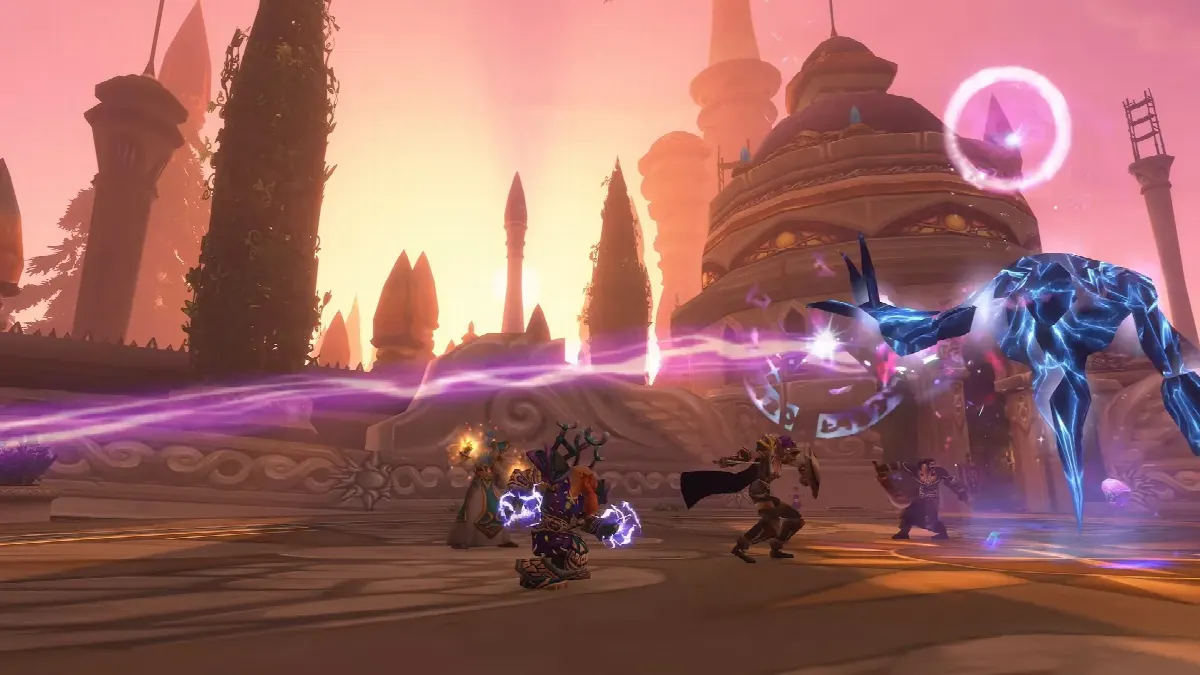
WoW Forever addons are allowed: Blizzard has confirmed that you can still customize your interface with addons, but with the same restrictions that modern WoW has had since Midnight. Combat values are locked for addons during combat, so classic combat helpers like WeakAuras are gone, while Questie, bag, map and Auction House addons work. Here you learn how to install addons step by step, what helps when they fail, which addons are worth it for each purpose and which features Forever already has built in.
Are addons allowed in WoW Forever?
Yes, addons are explicitly allowed in WoW Forever and part of the game. In September 2026, a Blizzard representative explained that Forever shares the interface technology of current WoW, including most of the addon APIs. The developers want to keep the customization addons offer, but they don’t want addons to have “too much power” over gameplay.
Blizzard doesn’t enforce this with ban waves but technically: whatever an addon isn’t allowed to do simply doesn’t work. An addon can’t get you into trouble as long as it only uses the official API. What is forbidden are programs outside the game that play for you, such as bots or auto-clickers. Blizzard’s terms of use cover those, and they lead to bans.
What does Blizzard block for addons in Forever?
Forever adopts the addon rules Blizzard introduced with Midnight. Many combat values are “secret” during combat: an addon may display them, but it can’t calculate with them or make decisions based on them. This mainly affects these areas:
- Combat log: Addons no longer read the combat log themselves. Damage meters like Details therefore use the data of the built-in damage meter.
- Buffs, debuffs and cooldowns: In combat, they don’t give addons exact values. Aura addons that build alerts from them only work in a limited way.
- Boss mods: There are hardly any boss warnings for the new Forever dungeons because addons can no longer evaluate encounter data.
- Automatic messages: In instances, addons can no longer post in chat on their own, for example to make callouts.
Interface, bag, map, quest and Auction House addons are barely affected because they only organize and display. Addons that calculate in combat or make decisions for you are hit hardest.
How do you install addons in WoW Forever?
You install addons in WoW Forever either with an addon manager or by hand in the AddOns folder of the Forever version. In both cases, make sure you use the Forever version: addons for Classic Era or regular WoW don’t load or cause errors.
Where is the WoW Forever addons folder?
Forever has its own folder in the WoW directory. Addons go into World of Warcraft\_forever_\Interface\AddOns, so with a default Windows install that is C:\Program Files (x86)\World of Warcraft\_forever_\Interface\AddOns. The fastest way there is the Battle.net app: select WoW Forever, click the gear next to “Play” and then “Show in Explorer”. If the Interface or AddOns folders are missing, create them yourself.
Installing addons with an addon manager
- Install an addon manager, like the apps the big addon portals offer.
- Choose World of Warcraft and explicitly select WoW Forever as the game version. If the manager doesn’t find the game, add the game folder manually.
- Search for the addon and install it. The manager fetches the Forever version and required dependencies automatically.
- Restart the game completely. WoW only loads new addons when the program starts.
- Keep your addons up to date with the manager, ideally while the game is closed.
Installing addons manually
- Download the WoW Forever version of the addon.
- Unzip the file. The game doesn’t read a ZIP archive in the AddOns folder.
- Move the unzipped addon folder directly into
_forever_\Interface\AddOns. The file ending in.tocmust sit directly in that addon folder, not one level deeper. - Restart WoW Forever and check the addon in the AddOn List.
How do you enable addons in game?
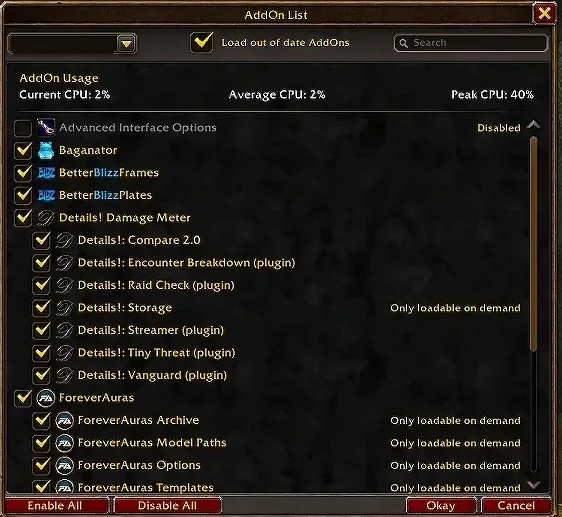
You enable addons on the character select screen: the “AddOns” button in the bottom left opens the list of all installed addons. Tick every addon that should load, for all characters or just the selected one. At the top of the window is the “Load out of date AddOns” checkbox: with it, an addon also starts if its version number doesn’t match the current game version.
Why is an addon not working?
If an addon is missing from the list or doesn’t load, it almost always comes down to one of a few causes. Go through them in order:
| Problem | Cause | Fix |
|---|---|---|
| Addon not in the list | wrong folder, such as the Classic Era or regular WoW one | move it to _forever_\Interface\AddOns |
| Addon not in the list | doubled folder after unzipping, such as AddOns\Questie\Questie | move the inner folder up one level |
| Addon not in the list | installed while the game was running | restart WoW Forever completely |
| “Out of date” or “Incompatible” | version for a different game version | get the Forever version; Forever addons use interface number 16001 or their own Forever file |
| Missing dependency | companion addon not installed, such as QuestieDB for Questie | install the companion addon too |
| Addon loads but shows nothing in combat | it needs locked combat values | use a Forever alternative or a built-in feature |
“Out of date” doesn’t automatically mean an addon is broken. With “Load out of date AddOns” you can try it. If it doesn’t work, wait for an update from the author. Many authors release separate Forever versions, often with “Forever” in the name.
Which features does WoW Forever already have built in?
WoW Forever runs on the modern client and therefore ships with many features you needed addons for in old Classic. Check this list first before installing an addon:
- Damage meter: shows the group’s damage, healing and DPS. It is turned off by default and enabled in the options.
- Cooldown Manager: shows the cooldowns of your abilities as icons you pick yourself.
- Edit Mode: move and scale action bars, unit frames and many other windows freely.
- Quest objectives and tracking: objectives of accepted quests appear on the map and in the quest log.
- Combine bags: a button on your bag merges all bags into one.
- Swing timer and a modern Auction House: both were only available through addons in Classic.
What’s missing: Forever has no built-in threat meter for tanks, and the map doesn’t show quests you haven’t accepted yet. That’s exactly where addons help the most.
Which addons are worth it in WoW Forever?
The best addons for WoW Forever add what the game doesn’t have built in. The table shows popular addons by purpose that work with Forever (as of late November 2026). Addons change quickly, so check for a current Forever version before installing.
| Purpose | Addon | What it does |
|---|---|---|
| Questing and leveling | Questie (with QuestieDB) | shows quest givers, objectives and turn-ins on the map and minimap |
| Questing and leveling | RestedXP | step-by-step leveling route, roughly the first 20 levels free, paid after that |
| Bags | Baganator, Bagnon | all bags in one window, search, bank and alts at a glance |
| Auction House | Auctionator | scan prices, sell and buy faster |
| Damage meter | Details! | more detailed view based on the built-in damage meter |
| Raids and bosses | Deadly Boss Mods, BigWigs | boss warnings, so far only limited for new Forever content |
| Tank | ThreatClassic2 | threat meter that Forever doesn’t have built in |
| Professions | GatherMate2, SkillUp Forever | remembers herb and ore nodes, skill-up chances when crafting |
| Maps and coordinates | OpenMap, Leatrix Maps, TomTom | larger world map, coordinates, waypoint arrow to targets |
| User interface | Leatrix Plus, Bartender4, Plater, ElvUI | quality-of-life features, action bars, nameplates, a completely new interface |
| Aura displays | ForeverAuras | WeakAuras successor for Forever, in combat only with allowed data |
Which addons do you need for questing and leveling?
Questie is the most important leveling addon because Forever only shows objectives of quests you’ve already accepted. Questie also marks quest givers you haven’t met yet. Since Questie 12 you also need the companion addon QuestieDB, which an addon manager installs automatically. Some quests that are new in Forever are still missing from Questie. For the route through the zones, use the leveling guide from 1 to 60; the leveling zones by level show which areas fit your level.
Which addons help tanks and healers?
Tanks mainly need a threat meter because Forever doesn’t have one built in. ThreatClassic2 or the Tiny Threat module of Details show who currently has aggro. Healers do well with the built-in raid frames and click casting. Classic healer addons are limited by the secret combat values because they can no longer calculate with health and buffs in combat. Which class takes which role is covered in the best class guide.
Which addons help with professions?
For gathering professions, GatherMate2 remembers every herb and ore node. The nodes fill up as you play; there is no ready-made data pack for Forever. SkillUp Forever shows in the profession window which recipe still gives skill points. All recipes of Herbalism, Mining and the other professions are in the professions overview, the best combination per class in the professions guide.
Are boss mods worth it for dungeons and raids?
Deadly Boss Mods and BigWigs work in Forever but so far offer hardly any warnings for the new dungeons because addons may no longer evaluate encounter data. Install only one of the two. How useful they are in the raids starting December 9 will only become clear at launch. Bosses and instances are listed in the dungeons and raids overview, and the dungeon guide explains how to find a group. You don’t need an addon for your raid setup: the raid buffs of every class are collected on our site, with more preparation in the raid guide.
What about WeakAuras in WoW Forever?
There is no official WeakAuras version for WoW Forever because the secret combat values block exactly what WeakAuras is built on. The built-in Cooldown Manager and forks like ForeverAuras take its place. They show buffs and cooldowns, but in combat they can only work with the data Blizzard allows. Install only one fork, as they overwrite each other.
How many addons should you use as a beginner?
As a beginner, you get by with just a few addons in WoW Forever because so much is built in. A sensible start is three to five addons:
- Questie with QuestieDB for questing.
- A bag addon such as Baganator.
- Auctionator once you trade on the Auction House.
- Enable the built-in damage meter and Edit Mode.
- For tanks, a threat meter as well.
You don’t need more at the start. Every extra addon is one more thing that can break after updates. Everything else that matters at the start is in the beginner guide. Plan talents and gear without any addon in the build planner, and find flight paths, vendors and trainers on the world map. Search all items and spells in the database.
Frequently asked questions
Can you get banned for addons in WoW Forever?
No, not for addons that run through the official API. Whatever Blizzard doesn’t allow, the game blocks technically. Bans are for programs outside the game that play for you automatically.
Do Classic addons work in WoW Forever?
Mostly not. Forever uses the API of modern WoW, not that of Classic Era. You need the Forever version of an addon, recognizable by interface number 16001 or its own Forever file.
Does Questie work in WoW Forever?
Yes. Questie works in Forever and also needs QuestieDB. Some quests that are new in Forever are still missing from its data.
Do you have to update addons after a patch?
Yes, often after bigger patches. When Blizzard changes the interface number, old addons count as out of date. Update them with your addon manager or download the new Forever version manually.
Where do you enable out-of-date addons?
On the character select screen via the “AddOns” button in the bottom left. At the top of the AddOn List, tick “Load out of date AddOns”.


Comments
Loading comments …
Join the discussion with a free account
Anyone with a RaidDex account can comment – one click with Discord, Steam or Battle.net is enough. Your progress is also backed up and the same on all your devices.
Already have an account? Sign in
One click with Discord, Steam or Battle.net is enough – no new password needed. Whatever you have already saved in this browser moves into your account when you sign in. Only you can see your profile.